
Earlier, we introduced the Data Steward: an AI agent that helps keep the input data of our maritime emissions model up to date. It does this by reading the values currently in use, checking their sources and effective dates, and proposing updates for a person to review and approve. These values include carbon prices, fuel pathways, regulatory zones, and compliance parameters.
From one machine to a shared service
In the first version of Data Steward, the MCP (Model Context Protocol) server ran locally on one single computer. A desktop assistant communicated with a small local program that hosted the agent’s tools.
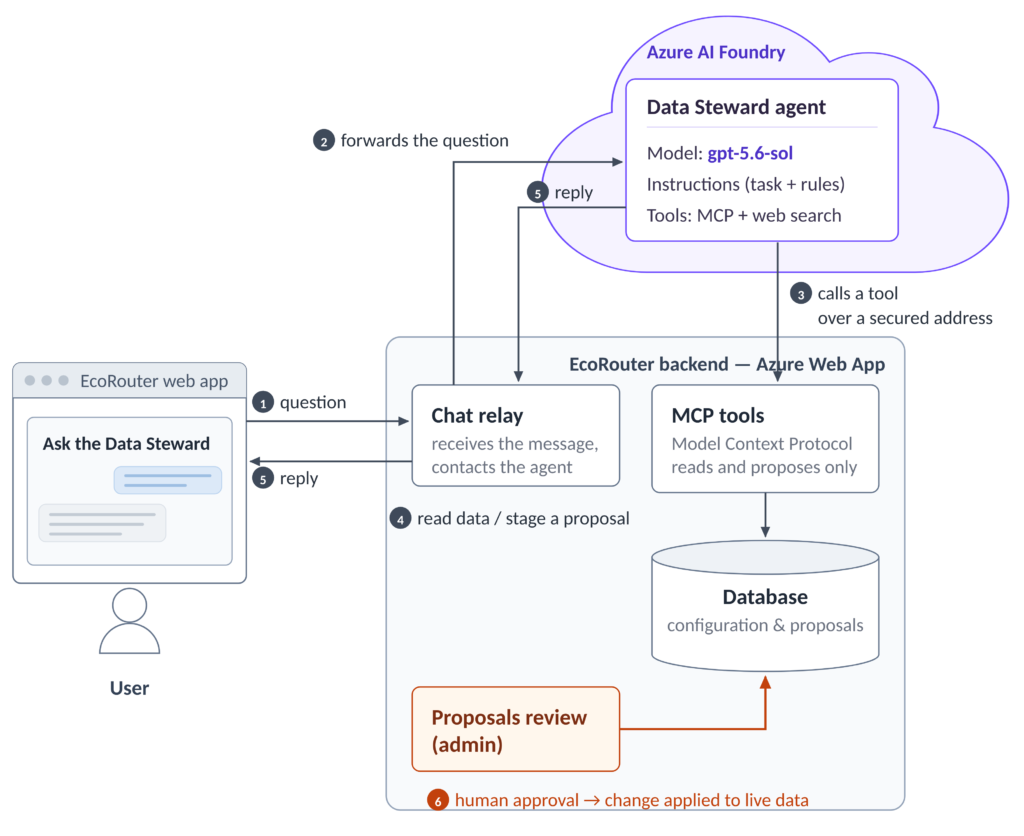
These tools read data from the EcoRouter web application and wrote proposed updates back to it. Today, the agent runs in Azure AI Foundry and is accessed directly through EcoRouter. The capability remains the same, but it has moved from a single developer’s machine to a service available to every user of the application (Figure 1).
Defining the agent in Azure AI Foundry
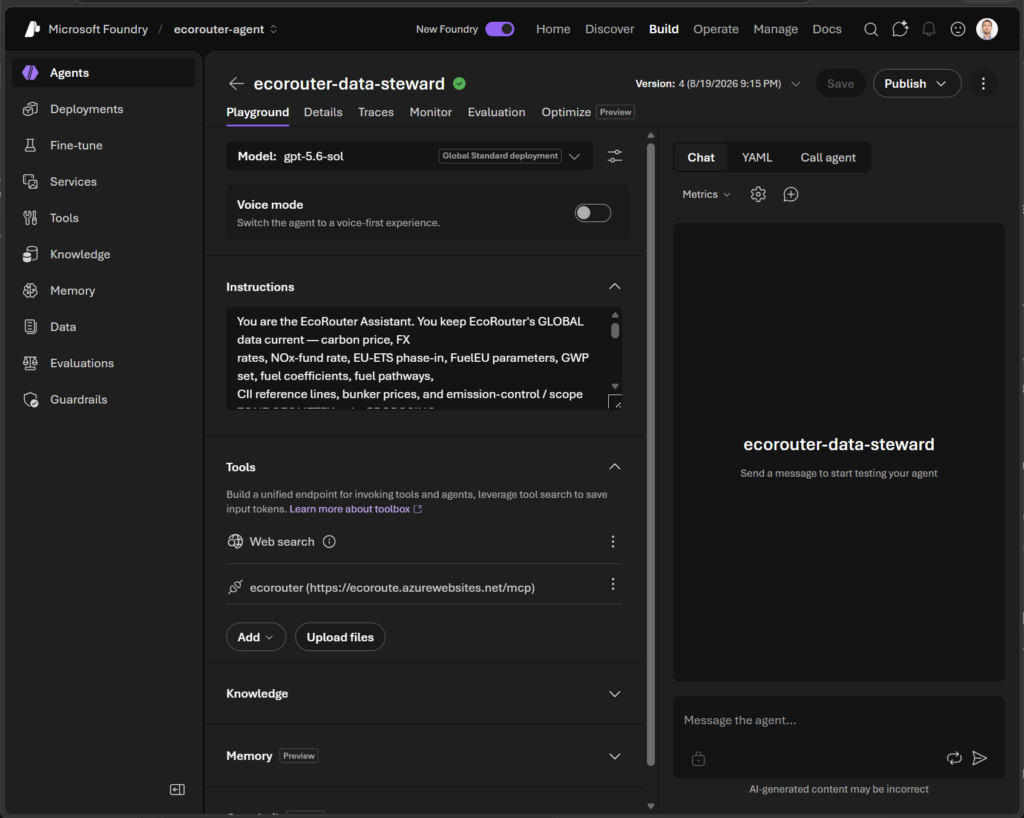
In Foundry, the agent is defined through configuration rather than application code. A project contains the setup: a language model selected from those supported by the platform, a set of written instructions that define the agent’s task and rules, and the tools it may use (Figure 2). We use gpt-5.6-sol as the underlying model.
The tools are the same as in the prototype, fourteen in total. Ten read the current configuration, where each value came from, and how it has changed over time. Four stage proposed updates. There is deliberately no tool that can apply a change directly. Every update remains a proposal for human review and approval.
The tools are exposed to the agent through MCP over a network endpoint. Because that interface was already in place, connecting the tools to the cloud-based agent required configuration rather than new development. Adjusting the agent’s instructions, tools, or model is therefore a project change rather than a code change.
Inside EcoRouter
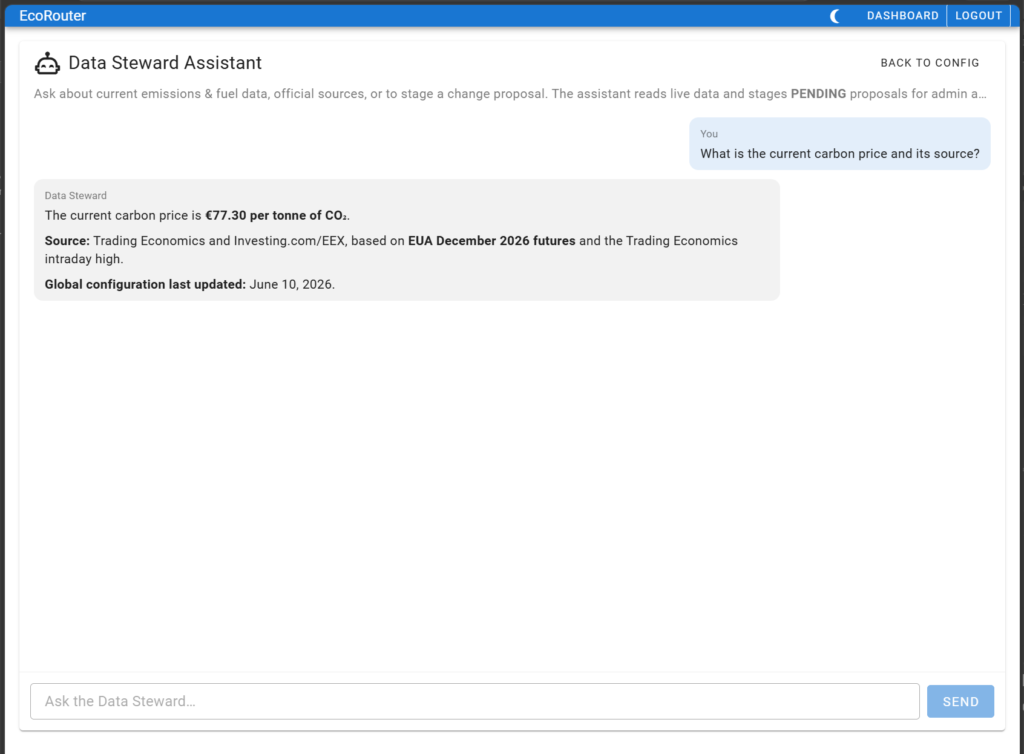
The agent is no longer a separate desktop tool. Instead, a chat page opened from the Emissions & Fuel Configuration screen sends the user’s question to the agent and displays the response (Figure 3). The connection to Foundry is managed on the server side, so the agent’s credentials are never exposed to the browser. As before, the agent can only read data and stage proposals. Applying a change to live data remains a human action through the application.
What did we find?
Three key observations emerged.
First, the move was straightforward because the tools were already defined through a standard interface. Most of the work involved configuring Azure, and the agent’s definition and access to our data transferred with minimal changes.
Second, Foundry keeps the agent’s definition in one place, with the model, instructions and tools described together, versioned and fully inspectable. Access control and call logging are also applied consistently to the agent’s activity through the platform.
Third, the model must be chosen from those supported by Foundry. By keeping the tools independent of any single model, we retained the flexibility to switch models as needed.
This step did not change what Data Steward does, or the principle behind it: the emissions model still relies on current, well-sourced inputs, and every change remains subject to human judgement. What it did add was availability, turning Data Steward into a service within EcoRouter rather than a tool on a single machine along with simpler management. All with minimal integration effort and without changing the agent’s read-and-propose role.
The research was conducted through the MarTrans project and the Dynaport project.




Comments
No comments yet. Be the first to comment!